
Get a Leg Up On The Competition With Google Alerts
Google Alerts is an often overlooked, but powerful tool.
In just a couple of minutes, you can set up your own 24/7 intelligence center to constantly monitor mentions of your business online and keep an eye on what your competition is doing.
You won’t have to invest much time or effort into setting this up. Instead of paying for a social listening tool, you can utilize Google Alerts, as it’s free for everyone to use!
How Do I Set Up Google Alerts for My Business?
To get started, go to google.com/alerts. Google will automatically populate suggestions, starting with your own name. These can be interesting, but might not be useful for your business.
To illustrate this, we’ll pretend you’re running a Ford dealership.
To create your first alert, start typing a search query in the “Create an alert about…” box. Let’s say you want to be alerted any time your dealership is mentioned online. Search for your dealership by name. Use quotes to only find exact matches, like “My Ford Dealership.”
Since you don’t need to be alerted when you mention your dealership by name, you can filter out anything on your own domain, as shown below. You do this by including -site:[Domain].
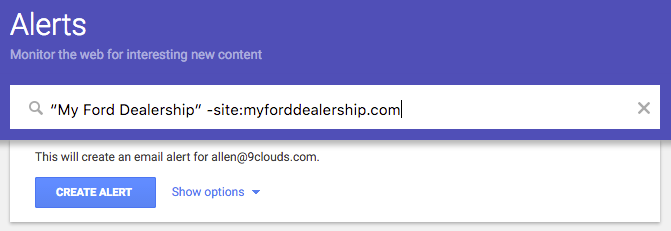
If you want to be alerted for reviews mentioning your dealership, you could create an alert for: “My Ford Dealership” review. Or, to see local reviews of the new Ford F-150, you could create an alert for: Ford F-150 in Sioux Falls review.
Can I Set Up Google Alerts for My Competitor?
Yes!
While you should exclude your own domain when monitoring your brand, it’s a good idea to do the opposite when watching a competitor. By creating an alert for their domain name, you can be notified when they add a new product feature, service offering, or promotional sale.
Monitoring the competition can be helpful when looking for ideas for your own digital marketing.
Take Your Google Alerts to the Next Level with These Options
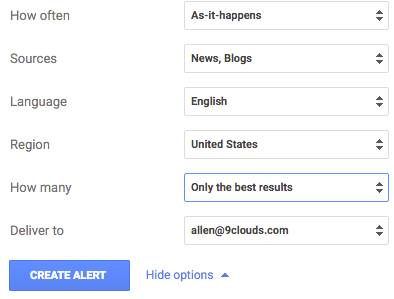
How Often: How often do you want Google to alert you? Unless you need real-time, instant updates every time your business (or someone else’s) is mentioned online, you should leave this at “At most once a day” to keep your inbox from filling up with alerts.
- As it happens
- At most once a day
- At most once a week
Pro Tip: If you want real-time updates, keep your inbox from being overwhelmed by creating an email filter for Google Alerts.
Sources: What kind of results are you looking for? You’ll probably want to leave this as automatic, but if you only want to search for blogs, videos, news, or any specific combination of media, you can tweak it here.
- Automatic
- News, Blogs, Web
- Video, Books, Discussions, Finance
Language: This field needs no introduction. What language(s) do you and your customers speak? This will default to English.
Region: What country is your business located in? Where are your customers? If you’re a digital marketing agency in the United States with international clients, you’ll have to update this section.
How Many: It’s best to let Google deliver “Only the best results.” Usually. If you’re looking for long tail keywords or specific local search, you can set this to “All results.”
Deliver To: What email do you want these alerts to go to? You can also add an RSS feed.
Use Advanced Search Operators to Master Google Alerts
Google Alerts support advanced search operators, too.
We’ve already mentioned using -site: to filter out your own domain. You can also use it (-) to filter out undesired keywords. If you want to monitor for used vehicles, but aren’t interested in trucks: used vehicles in Sioux Falls -trucks.
Here are some other examples you can use in your Google Alerts:
- Use an asterisk as a wildcard. Used * in Sioux Falls
- Use quotes to keep phrases together. “automotive marketing” “South Dakota”
- Use OR to find pages that match several words. You can use this to catch misspellings or term variations without having to create separate alerts. For example: ford f-150 OR f150
- Mix and match OR and exclusions to hone in on the results you want to monitor. (Name) dealership car OR suv -truck
Why Should My Business Use Google Alerts?
Instead of manually checking Google, social media platforms, or review websites, Google Alerts bring relevant and timely mentions of your business (or competitors) straight to your inbox.
This gives you the opportunity to take the next step, whether that’s thanking a happy customer, addressing a concern before it escalates, or jumping into a discussion where your expertise can add value.
Over time, you may start to notice patterns in the words and phrases people use when they mention your business online. Use this information by turning these positive sentiments into keywords that show up throughout your website and branding.
In short, Google Alerts is a free reputation management and keyword research tool. Why wouldn’t you want to take advantage of that?
Make Sure Your Business Can Be Found Online
Setting up Google Alerts is a great way to monitor the competition and see how your business is doing online. It gives you insight into brand mentions, reviews, industry trends, and new marketing opportunities — all without having to constantly search for it yourself.
However, this isn’t going to help your customers find you. That’s where Search Engine Optimization (SEO) and Answer Engine Optimization (AEO) make a huge difference.
Think of Google Alerts as your listening tool and SEO/AEO as your visibility tools. When they work together, you stay informed and competitive.
If you want to learn how a full-time inbound marketing partner like 9 Clouds can improve your business’s online presence, fill out our free digital marketing proposal form.
SHOW UP IN SEARCHES »
Angie Vognild
Angie is always looking for creative ways to connect with an audience, whether it’s through a video, an infographic, a blog post, or a website. When she’s not being creative at work, Angie enjoys traveling and cruising the world. Learn more about Angie.